
How many days will it take? The most important thing before you accept the job

Let's talk about how to look at what a client asks for and know how many shoot days to scope for.
How to Estimate Shoot Days for Client Projects
Here's the thing: clients usually don't know how long video/photo production actually takes. They can't see behind the curtain of your work, so they often underestimate the time needed. This leads to misunderstandings when scoping projects.
Recently, we had a client request "a couple product photographs." Seemed simple enough for one day, right? Wrong. Once we broke down the actual requirements—print-quality, focus-stacked images of multiple products, multiple angles per product—we realized it would take three full days, not one.
Here's how to avoid this trap:
Step 1: Break Down the Deliverables
Turn vague requests into specific, countable items using three filters:
- Concrete – Define exactly what they want (e.g., "30-second recap video," "product photos on white backdrop")
- Distinct – Separate grouped requests into individual components (e.g., "product photography" becomes "straight-on shots" + "hero shots")
- Singular – Count each unique output (e.g., one video in both 16:9 and 9:16 formats = 2 deliverables; one photo per product, per angle, per aspect ratio = individual deliverables)
This gives you a total deliverable count you can actually schedule.
Step 2: Identify Major Logistics
Look for the big time-eaters:
- Location changes – Multiply your travel estimate by 1.5-2x, then add setup/breakdown time. Better to arrive early than fall behind.
- Time constraints – If you're waiting around for golden hour or specific timing, consider whether a second standard day makes more sense than one long overtime day.
- Wardrobe changes – Budget 10 minutes minimum for quick changes, 20-30 minutes for complex ones. If you only have your subject for one hour but need two wardrobe changes, flag this immediately.
Step 3: Map Out the Timeline
Create a rough schedule in Excel (or similar). You don't need precision yet—just avoid being drastically wrong.
List each deliverable with:
- Time to capture (including all necessary takes)
- Setup time for that shot
- Total time needed
Map this against a standard 10-hour day to see what actually fits.
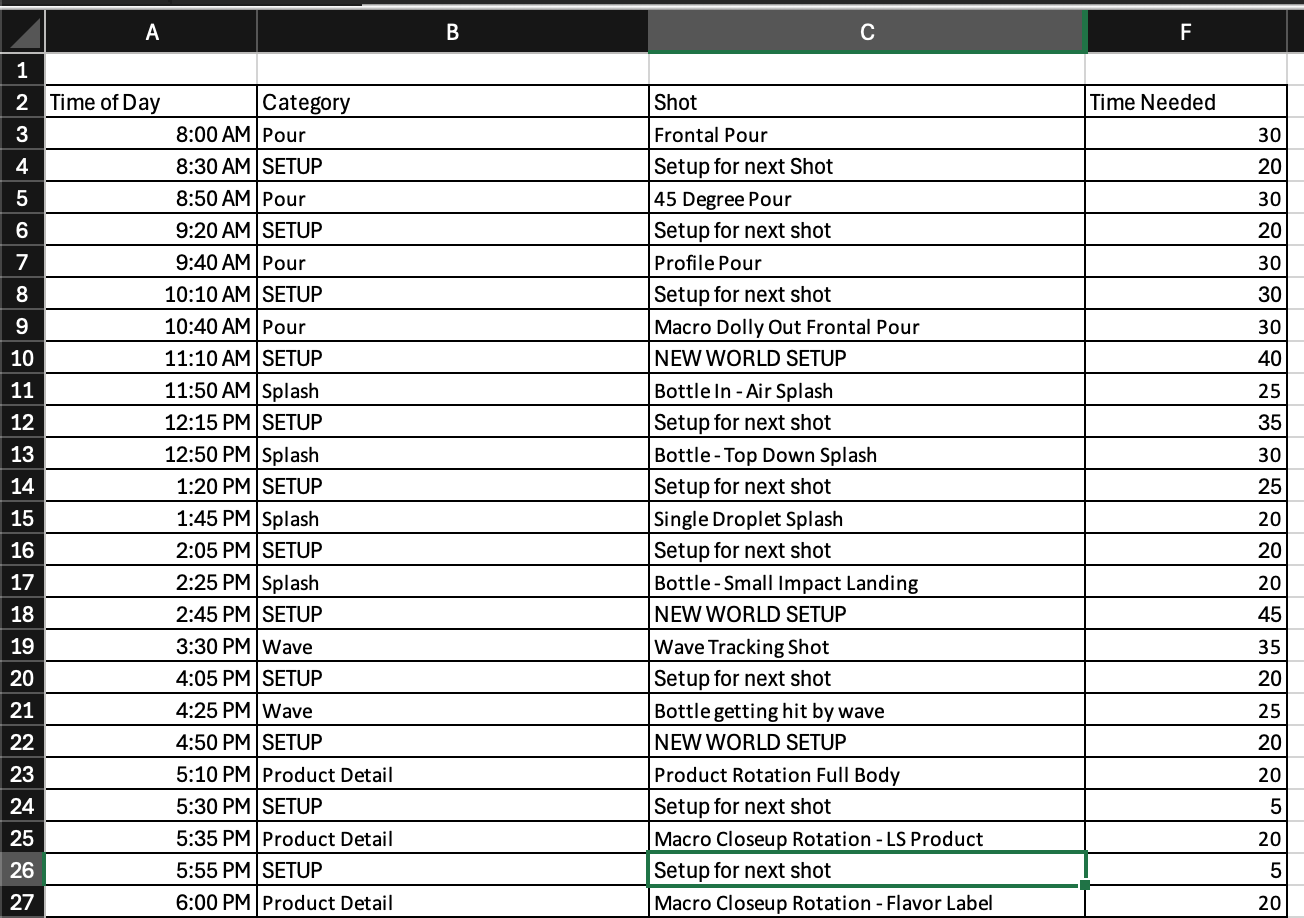
Pro tip: I use a dynamic Excel formula that auto-updates the time-of-day column as I adjust estimates: =TIME(0, [minutes needed], 0) + [previous end time]
For example, in cell A4: =TIME(0,F3,0) +A3
A downloadable Excel or Google Sheets template can be found here:
 Nick Staniszewski
Step 4: Communicate
Present your findings clearly to the client. Show them how many days the project realistically requires based on their deliverables. This transparency prevents scope creep and sets everyone up for success; it's better to have the hard conversations earlier as expectations are still waiting to be set.
Clients don't always know what goes into production. Your job is to educate them with clear breakdowns so everyone's on the same page from the start. Transparency is the key to success, as being able to approach things from a common understanding and language from the start makes everything easier further down the line.


Comments ()